

Best Codeless Automation Testing Tools: Hands-On Breakdown
Written byPaweł Bylina


Updated: August 1, 2026View as Markdown
🤖 Summarize this article with AI:
💬 ChatGPT 🔍 Perplexity 💥 Claude 🐦 Grok 🔮 Google AI Mode
TL;DR Nine codeless automation testing tools, evaluated on who each is actually built for and where each falls short. BugBug for web-only SaaS teams (free, unlimited local runs), ACCELQ and Katalon for multi-surface enterprise stacks, Virtuoso QA for regulated teams, Testim for large fast-changing suites, KaneAI for plain-English authoring, Shiplight for AI coding agents, plus Reflect.run, Ghost Inspector, and CloudQA for onboarding speed, visual regression, and data-driven testing. Read the codeless vs low-code section before you shortlist — that distinction is what decides whether you hit a ceiling in month six.
Codeless and low-code automation tools solve a specific problem: getting to reliable regression coverage without owning infrastructure, hiring automation specialists, or writing scripts that break every time a developer renames a button.
Most QA teams don't stall because they lack tools. They stall because every tool they have requires someone who can write code.
Your manual testers understand the product better than anyone on the team. They know which workflow breaks when a customer skips a step, which form silently fails on Safari, which regression keeps coming back. But the moment that knowledge needs to become an automated test, it has to be translated into a script — and that translation belongs to an engineer who is already committed to shipping features.
So automation coverage stops growing at the speed of testing need and starts growing at the speed of available engineering time. Meanwhile the suite that does exist gets more expensive by the sprint: a redesigned checkout page breaks forty selectors, and the person who wrote them has moved to another team.
Codeless test automation attacks the translation step itself. Instead of turning product knowledge into code and then maintaining that code, the people who already know what to test build and own the tests directly.
Eleven tools made this list. Each one solves a distinct problem — this isn't eight variations of the same recorder. The sections below cover who each tool is built for, where it genuinely falls short, and which teams should skip it.
Tired of maintaining Selenium scripts nobody owns? You're not alone. Most QA teams don't leave open-source test automation tools because they're bad engineers — they leave because maintaining a testing framework takes more time than the actual testing.
These are the best no-code UI automation testing tools we evaluated — seven tools built specifically for automating web UI tests without writing code. Execution platforms and API/backend tools have their own sections further down. Skim this before reading the full entries.
| Tool | Free plan | Environments | Unique strength | Best for |
|---|---|---|---|---|
| BugBug | Yes (unlimited local runs) | Web (Chromium) | AI test recorder turns clicks into stable tests in minutes, with Adaptive Locators choosing the most durable selector per element and Edit & Rewind letting you fix any step without re-recording. | B2B SaaS teams, web-only |
| ACCELQ | Trial only | Web, API, mobile, desktop, mainframe | Natural-language test creation across the full enterprise stack, compiling to inspectable Selenium WebDriver code | Enterprise QA teams testing web, API, mobile, desktop, and mainframe in one platform |
| Katalon | Limited free tier | Web, API, mobile, desktop | One platform across all surfaces — start codeless, add scripting as complexity grows, no tool switch | Hybrid teams growing into complexity |
| BrowserStack LCA | Trial only | Web (real desktop browsers), real mobile browsers | Authoring built directly on top of a real-device execution cloud — tests run wherever coverage is needed, not just where they were recorded | Teams needing broad cross-browser and real-device coverage at scale |
| Virtuoso QA | No (demo only) | Web (Chrome, Firefox, Safari, Edge), API, database | One plain-English test spans UI, API, and database — with a human approval gate and audit trail over what the AI proposes | Enterprise and regulated teams needing governed AI authoring |
| KaneAI | Trial only | Web, API, mobile | Natural language test creation — write tests in plain English; AI maintains them as UI changes | QE teams, NLP-first authoring |
| Shiplight | Yes (bring-your-own-key option) | Web; partial support for Electron and browser-based desktop apps | Coding agents verify UI changes and author intent-based YAML tests directly in the git repository | Engineering teams using Claude Code, Cursor, Codex, or other AI coding agents |
| Testim | Trial only | Web, API | AI locators that auto-adapt when UI changes — reduces maintenance for large, fast-moving frontends | Enterprise SaaS, frequent UI changes |
| Reflect.run | Trial only | Web (Chrome, Firefox) | Fastest onboarding in the category — first test in minutes, zero setup | Small teams, simple cloud flows |
| Ghost Inspector | No | Web (Chrome, Firefox) | Screenshot comparison and visual regression built-in — best dedicated visual testing in the list | Visual regression, screenshots |
| CloudQA | Trial only | Web (Chrome, Firefox) | Data-driven testing support with strong reporting — separates test data from test logic cleanly | Web SaaS, eCommerce |
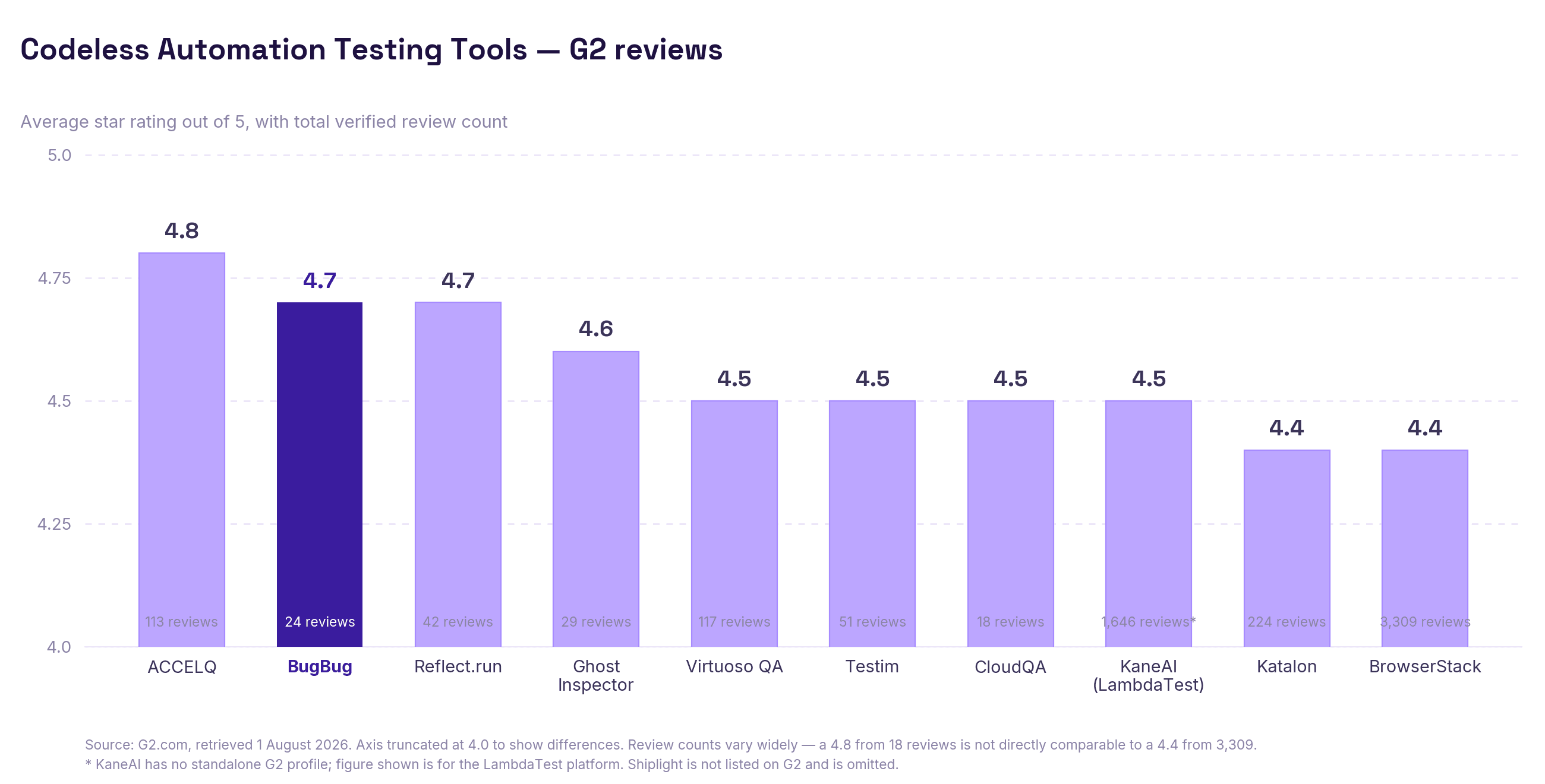
The best codeless test automation tools exist for a specific profile: teams without dedicated automation engineers, weekly release cadences, and no appetite for owning Selenium grids.
Use it if: you don't have dedicated automation engineers, your release cadence is weekly or faster, you want QA engineers and developers contributing without framework overhead, or you need regression coverage without owning Selenium grids or Docker infrastructure. The classic profile is a 2-person QA team at a 30-person SaaS company that needs to cover 15 core flows before every deploy — codeless tools exist for exactly this, especially when the benefits of codeless include broader participation from people without strong coding skills.
Avoid it if: you need deep framework-level control, your test logic requires heavy branching and custom architecture, or your team is already comfortable owning Playwright or Cypress infrastructure and has the engineering bandwidth to maintain it. Code-first tools give you more control — that control is worth the overhead when you actually need it.
The real question isn't "can I automate without coding?" It's: do I want to maintain a test automation framework? Most teams that choose codeless tools are making a deliberate trade-off: predictability and speed over architectural flexibility, including the ability to cover core flows in minutes rather than weeks. That's a legitimate choice in software testing, especially for teams where the people creating coverage are not primarily developers and don't want to spend their time writing code.
The terms are used interchangeably, but they're not identical. Codeless testing tools use web test recorders — you click through your app, and the tool writes the steps. Scriptless automation testing tools describe the same approach from a developer framing: no scripts, but the output is still structured test logic. No code testing (or nocode testing) is the broadest term — it covers any automation where the person running tests isn't writing code. All three describe the same category of tools in this guide.
Codeless and low-code get used as synonyms on pricing pages. They're not — and the difference decides whether you'll hit a wall six months in.
Codeless test automation tools promise you'll never touch code. You record, you run, you're done. That works right up until your app does something the recorder can't express: a conditional flow, a value pulled from an API response, a date that has to be tomorrow's date. Pure no-code tools handle this by not handling it.
Low-code test automation tools make the same recorder-first promise but keep an escape hatch open: when you hit the 5% of scenarios that need logic, you drop in a snippet of code instead of abandoning the tool. You don't write a framework. You write four lines of JavaScript, once, inside one step.
The practical difference:
| Codeless (pure no-code) | Low-code | |
|---|---|---|
| Test creation | Record and click | Record and click |
| Dynamic data (dates, tokens, API values) | Workarounds or unsupported | Custom code step |
| Edge-case handling | Limited to built-in actions | JavaScript when needed |
| Who can maintain tests | Anyone | Anyone — code steps are optional |
| Ceiling | You'll hit it | Much higher |
💡The rule of thumb
If your app has any dynamic data, third-party auth, or flows that branch on state — pick low-code. If you're testing a marketing site or simple forms, pure codeless is enough.
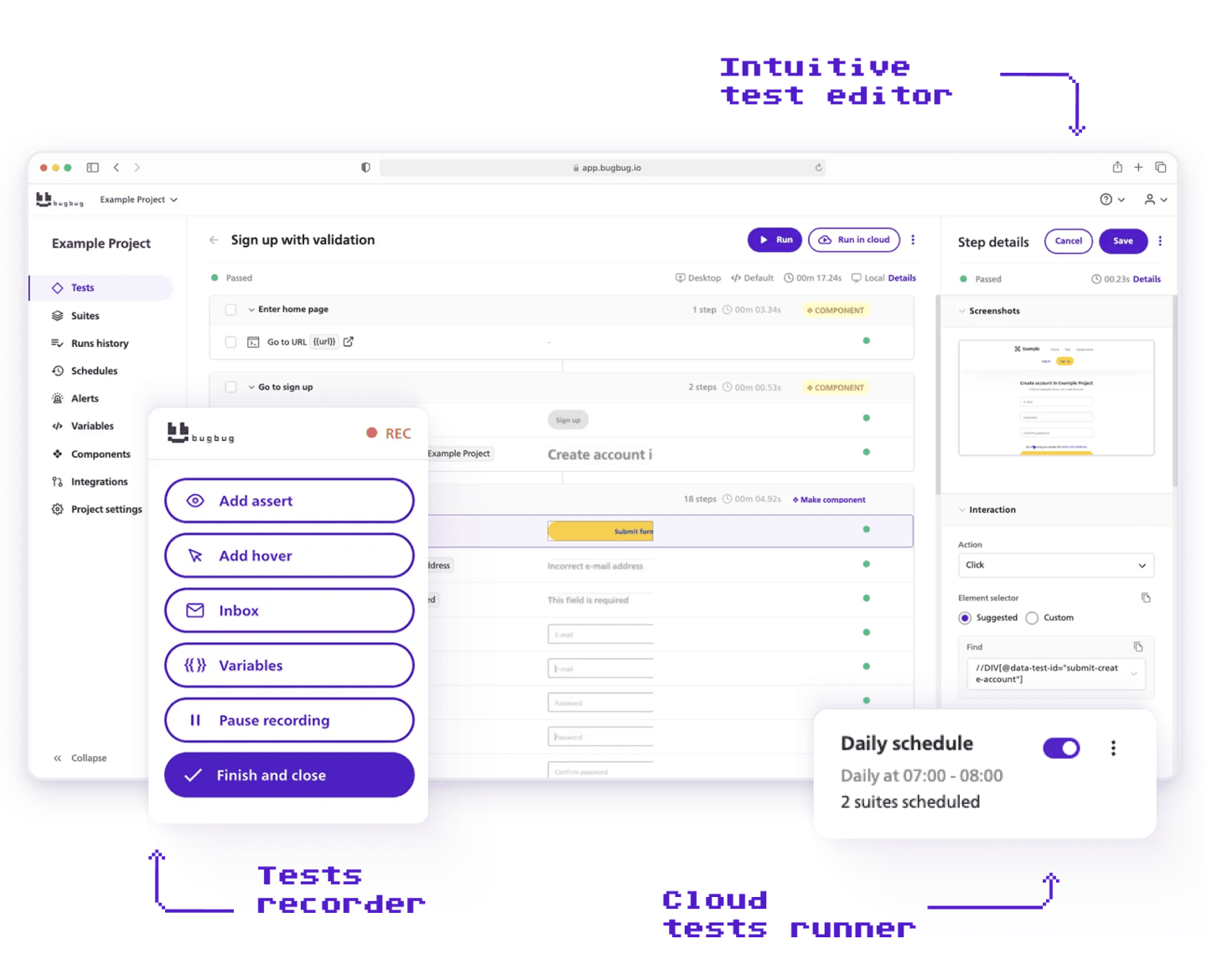
Best for: Web-only B2B SaaS teams that want fast, low-maintenance E2E automation without owning infrastructure.
Avoid if: You need Firefox, Safari, mobile, or desktop coverage — or your test logic is fundamentally branching/data-heavy from day one
I built BugBug because I watched too many companies struggle with software quality — not because they were lazy, but because open-source frameworks cost too much to maintain and hiring a QA is too expensive at their stage. So we made the easiest codeless test automation tool on the market: you record tests by clicking through your app, edit and rewind from any step, and run them locally or in the cloud — no Selenium grid, no Docker, no PhD in Playwright required. It's not for everyone (we're Chromium-only, no mobile, no cross-browser), but if you're a SaaS team that needs reliable regression coverage without a dedicated QA department, that's exactly who we built this for — and ease of use is still the #1 reason customers pick us.
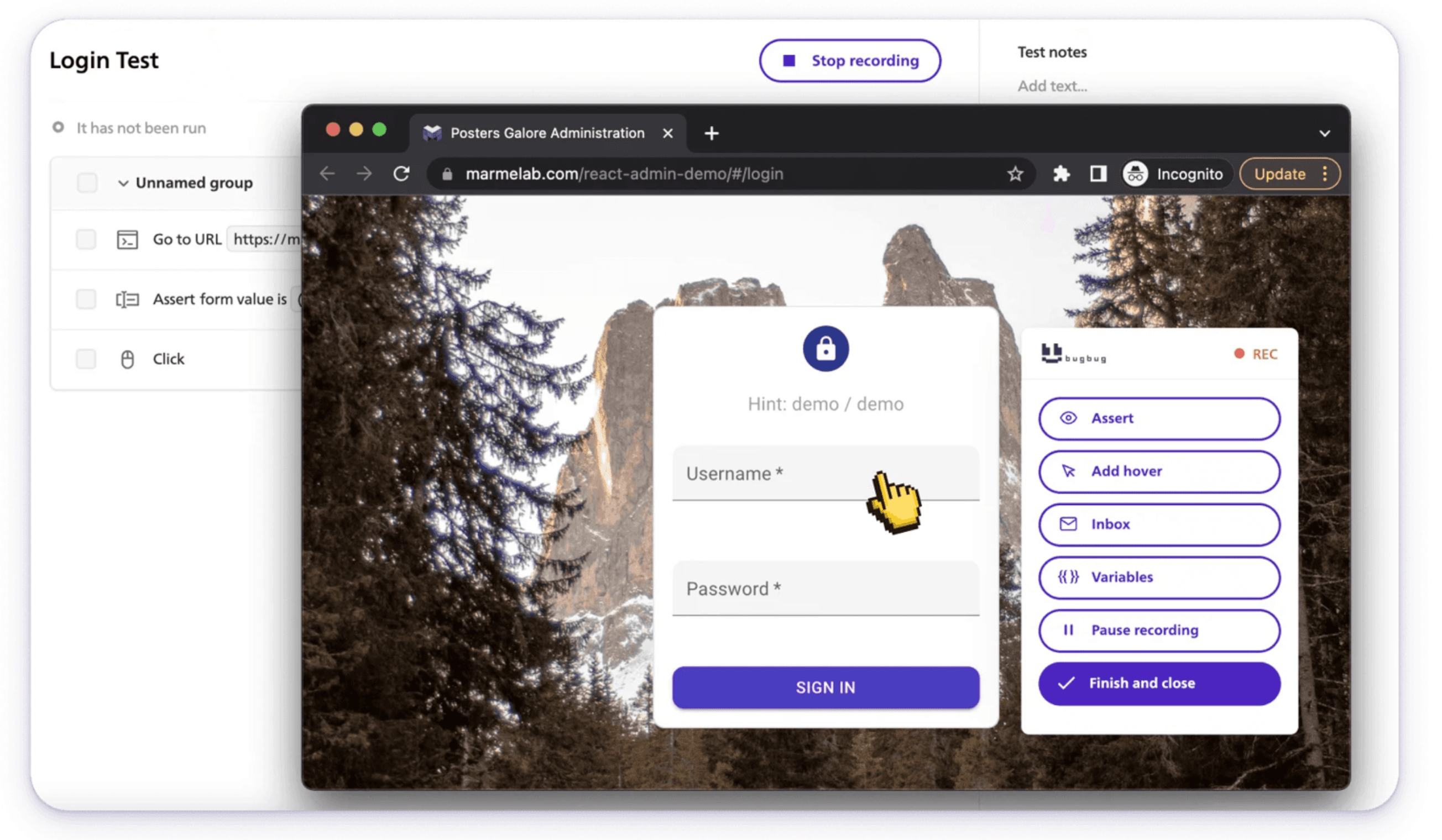
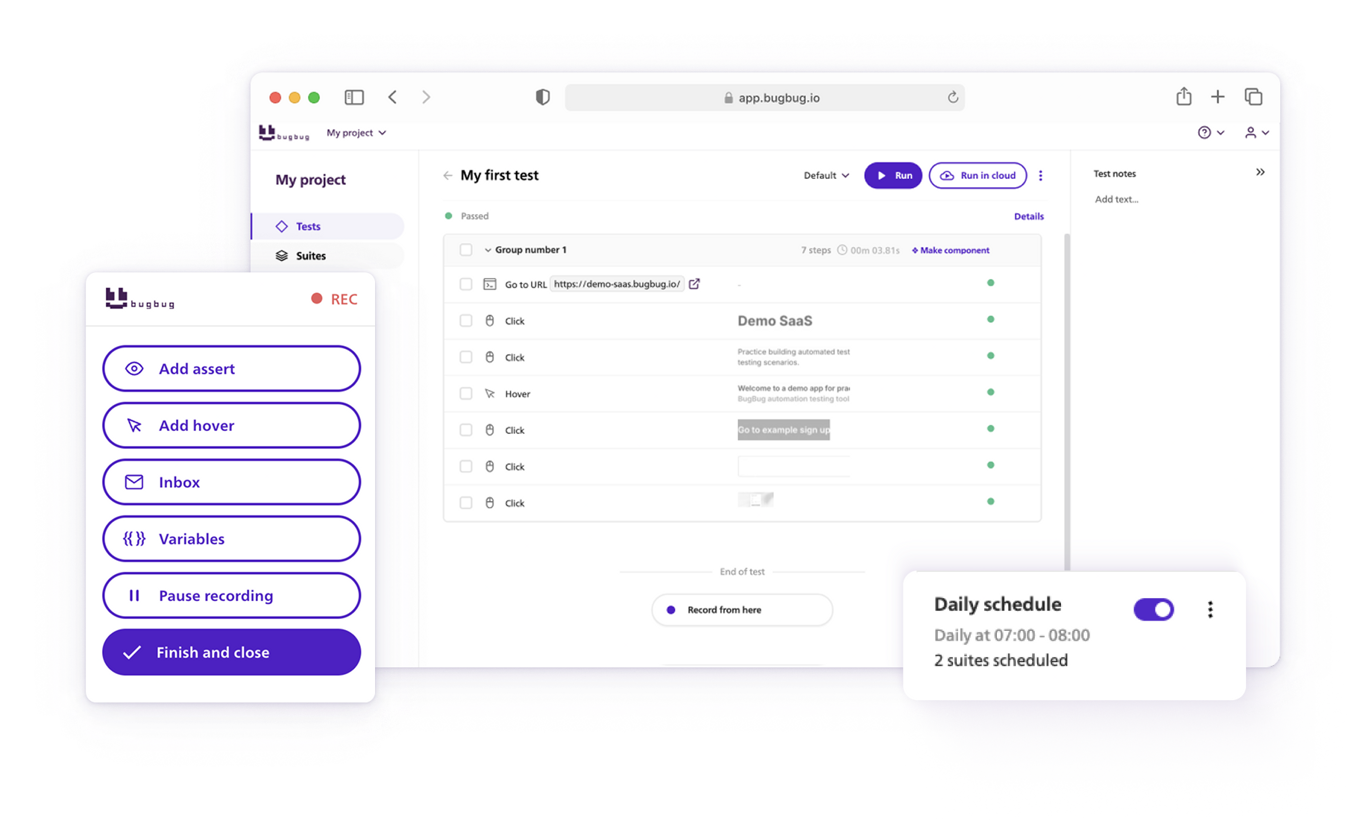
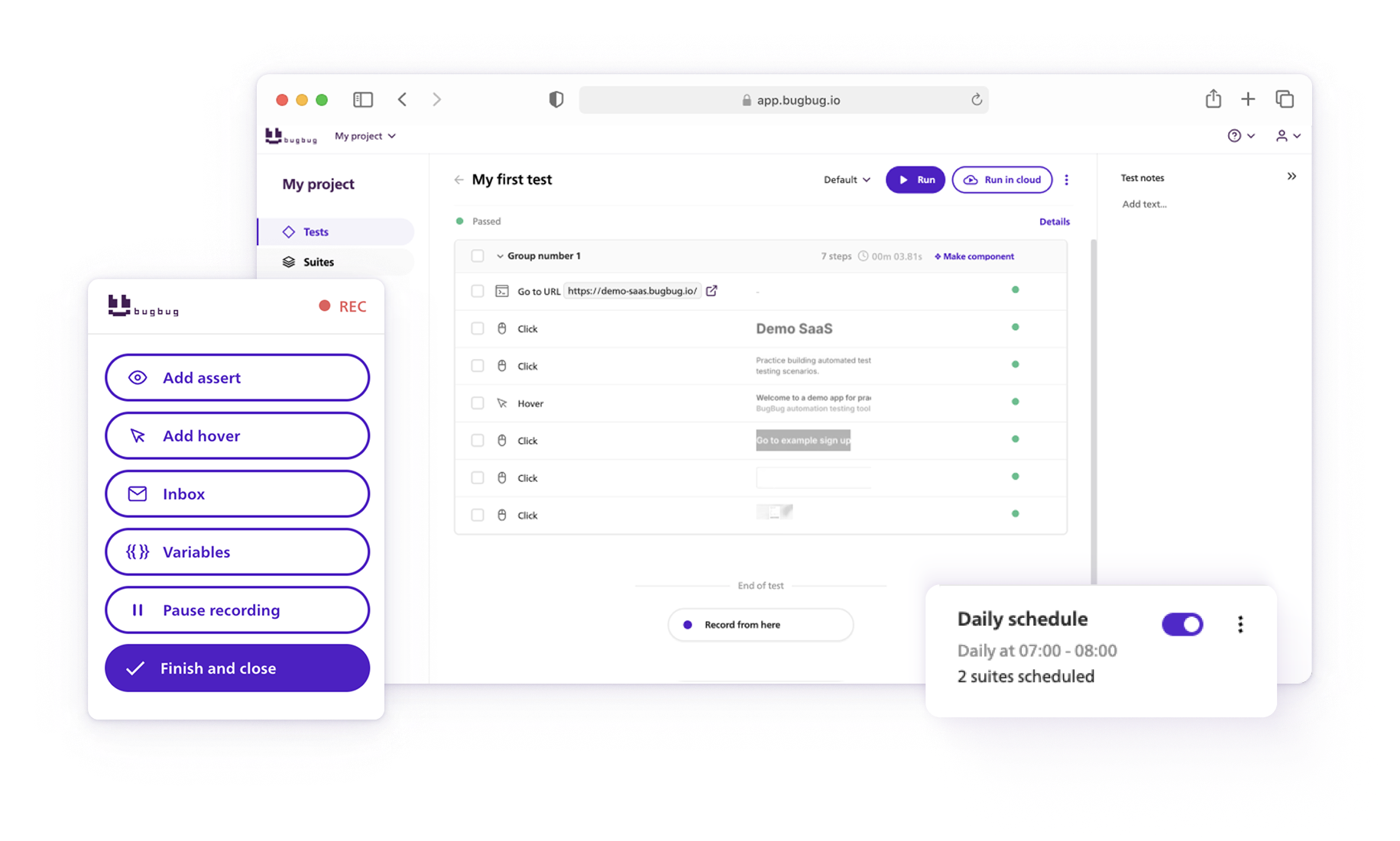
Here is what you'll see when you start recording your first test. The recording overlay automatically turns your clicks and typing into stable automation scripts. Powered by AI, BugBug selects the best element locators (Adaptive Locators) and handles page timing (Smart Waiting) completely on autopilot.
The practical case: Pilot.io, a 14-person SaaS team, reduced customer-reported issues from ~30 per month to fewer than 10 — a 60% drop — after switching to BugBug, while developers shifted focus back to building.
AI features: Adaptive Locators automatically choose the most stable selector strategy per element — no manual XPath or CSS required. Smart Click & Scroll mimics real user behaviour to handle dynamic UIs that shift on interaction. Smart Waiting detects when slow or async UIs are genuinely ready, eliminating manual delays and the flakiness that comes with them.
Supported environments:
Strengths:
Limitations:
I preferred BugBug because it hits the balance most low-code tools miss: fast to record, but the steps stay readable instead of turning into a black box. It slots straight into a normal dev and CI flow, so I can run the suite locally or trigger it on every push (using Github Action) without extra glue code. For a team that wants real coverage without babysitting a framework, it's the clear choice.
Pricing: Free plan (unlimited local testing, 4 testing suites). Paid plans (unlimited cloud testing) starting from $99/month.
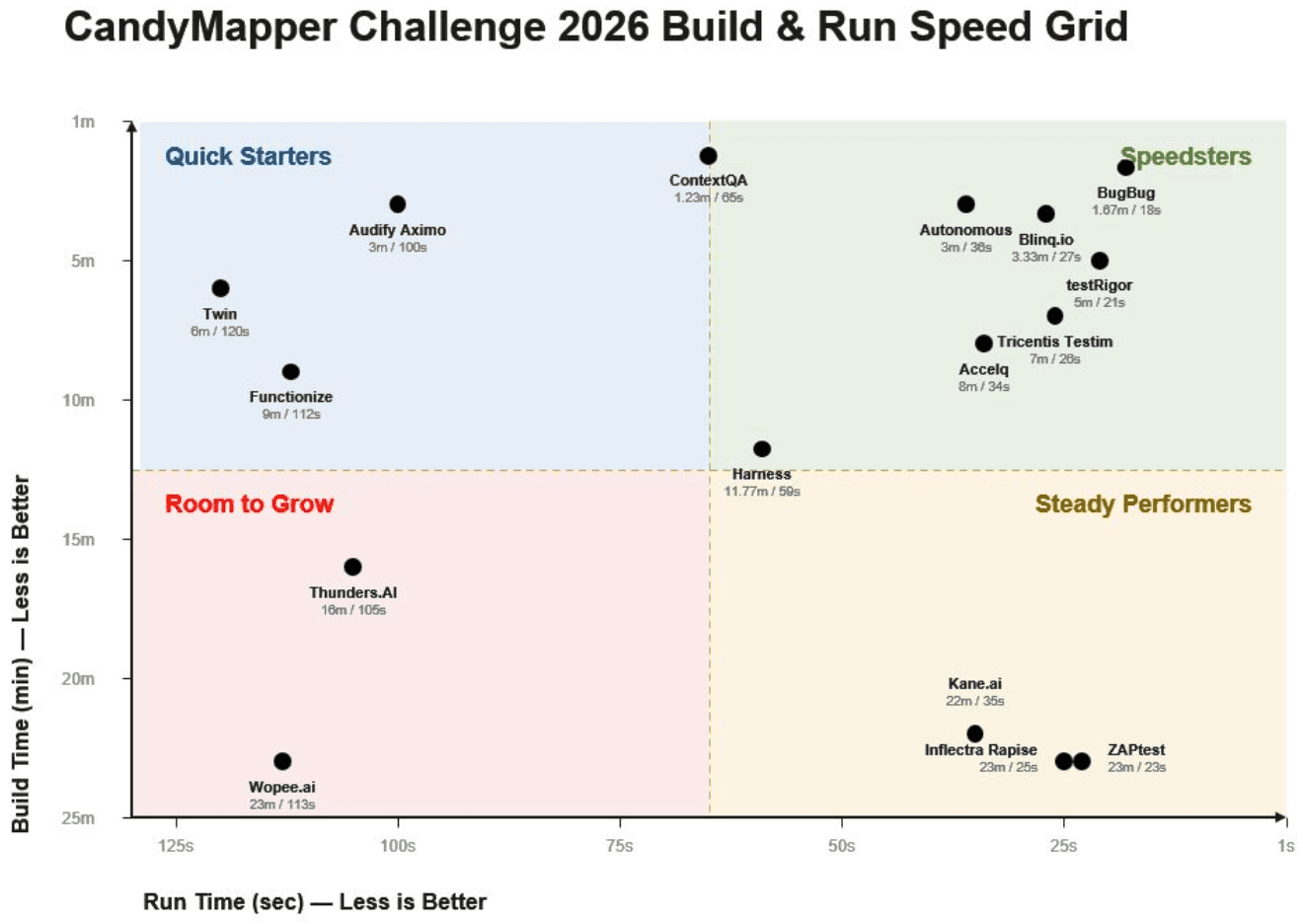
Don't just take our word for it. Paul Grossman - founder of the CandyMapper.com automation sandbox and author of Enhanced Test Automation with WebdriverIO - runs an annual, standardized speed test across codeless and AI-powered testing tools called the CandyMapper Challenge. Every tool builds and runs the same automation task on the same site.
In the 2026 results, BugBug had the fastest run time of all 16 tools tested (18 seconds) and the second-fastest build time (1 min 40 sec) — landing furthest into Paul's "Speedsters" quadrant (fast to build, fast to run), ahead of tools like testRigor, Tricentis Testim, and Blinq.io. Check Paul's profile for full results of the challenge.
Best for: QA teams testing web, API, mobile, desktop, and mainframe applications inside one platform, including Oracle, Salesforce, and SAP.
Avoid if: You want a working test this week — onboarding takes structured implementation (1–3 weeks), and pricing is quote-only
ACCELQ is the tool for a team that stopped pretending it's "just web testing."
Most tools in this list live in the browser. ACCELQ doesn't. One test asset library covers web, API — REST, SOAP, Kafka, message queues, the works — mobile on real devices, desktop, and mainframe. Manual and automated cases sit in the same place instead of four different tools nobody fully trusts.
Here's the part that actually matters: you describe the test in plain language — or hand it a Jira ticket — and QGPT Logic Builder turns that into automation logic across UI, API, and backend in one pass. Most "natural language" tools stop there and lock you in. ACCELQ doesn't. What comes out the other end is readable Selenium WebDriver code. You can open it, read it, export it, run it somewhere else if you ever need to.
That's the detail I'd check first with any AI-generated test tool: can I get my tests out, or am I renting them? ACCELQ passes.
AI features: An AI-driven change detection engine analyzes what changed in the application before updating a test. It distinguishes a cosmetic UI change from a change in the underlying business flow. It logs what changed and provides a one-click resolution path for review. The AI Recorder captures the full interaction event and saves it as a parameterized command. Forms with validation, input masking, or framework-controlled fields fire correctly on playback as a result. Smart Forms generates fill, update, and verify statements across multi-field forms in a single pass. This replaces building each field statement individually.
Supported environments:
Strengths:
Limitations:
Pricing: Free trial available; custom pricing based on organization size and modules (web, API, mobile, manual).
💡 Also read the best ACCELQ Alternatives

Best for: Hybrid teams that need codeless automation today and scripted flexibility as complexity grows — across web, API, mobile, and desktop.
Avoid if: you need any non-trivial business rule, conditional logic, or complex assertion still needs scripting knowledge (Groovy under the hood). If "no code, ever" is a hard requirement for who's writing tests, it falls short of that promise despite the low-code marketing.
Katalon is the tool I'd point a team at if they told me "we'll need mobile and desktop eventually." It costs you a slower first day — you're installing an IDE, not clicking a Chrome extension — but you're not migrating platforms in month eight when your API testing needs outgrow a pure recorder. That trade only makes sense if you actually know you'll need the breadth. If you're web-only and staying that way, you're paying setup-day tax for coverage you'll never use.
AI features: Smart Wait monitors JavaScript and network activity to detect when elements are truly ready — not just present in the DOM, but visible and interactive. This eliminates a large class of "element not found" errors caused by premature interactions.
Supported environments:
Strengths:
Limitations:
Pricing: Limited free tier. Paid enterprise plans with per-user pricing at scale.
Best for: Teams that need broad cross-browser coverage and access to real mobile devices at scale.
Avoid if: you don't have tests yet — BrowserStack won't write them for you, and running nothing across 2,000 environments is still nothing.
This is the rare codeless tool that doesn't have to apologize for where its tests run. Most tools in this category give you a recorder and leave execution as someone else's problem. BrowserStack Low Code Automation is a distinct product from the execution cloud people associate with the BrowserStack name — but it's built on top of it, and that's the whole advantage.
AI features: A Low-Code Authoring Agent handles natural-language workflow automation and converts written test cases into low-code tests. A Self-Healing Agent adapts tests to UI changes without manual selector updates.
Supported environments:
Strengths:
Limitations:
Pricing: Free trial. Paid plans quote-only — BrowserStack doesn't publish LCA pricing
Best for: Enterprise and regulated teams that need one plain-English test to span the UI, the API and the database, with self-healing and an audit trail.
Avoid if: You're a small web-only team that wants a free plan and a first test in two minutes, Virtuoso QA is built for enterprise breadth, not the lightest possible start.
Most tools in this list stop at the browser. Virtuoso QA doesn't. You write a test in plain English, and one test can check what the screen shows, what the API returns, and what the database stored, in a single pass. For a team whose regression risk spans those layers rather than the UI alone, that's the difference between one test and three tools that don't talk to each other.
Its real bet is governed autonomy, and it's precise about what that means. Today, AI compiles plain-English intent into exact browser actions, self-healing adapts tests and fails rather than guesses below a confidence threshold, and a deterministic engine runs them so the same test gives the same result every time. The fuller loop, where AI proposes test journeys and repairs as reviewable diffs for a human to approve, is rolling out through Touchstone (Currently in beta with selected customers and partners). The AI reasons while a deterministic engine executes, so autonomy never means an agent quietly deciding your test passed.
That governance is the differentiator. Where most tools here add AI to authoring or healing, Virtuoso QA keeps a human approval gate and a full audit trail over what the AI proposes, which is what regulated buyers increasingly want.
AI features: Natural-language authoring turns plain-English intent into executable steps. Self-healing adapts element identification when the UI changes. AI Root Cause Analysis groups failures and surfaces diagnostic evidence to separate real defects from environment noise. GENerator builds tests from existing suites, live screens, or written requirements.
Supported environments:
Strengths:
Limitations:
Pricing: Enterprise, quote-based. Demo available.
Best for: QE teams where the test-writer and the test-maintainer are different people.
Avoid if: you want to watch the test take shape while building it, or who needs local runs — KaneAI is cloud-only.
KaneAI bets on the one thing every other tool in this list still makes you do: click through your own app.
You write what you want tested — "log in as a new user, verify the onboarding checklist appears, confirm the first item can be checked off" — and it becomes a running test. No recording session, no browser choreography.
That's a real structural difference, not a spin on the same recorder everyone else ships. It matters most when the person who understands the test isn't the person with time to sit and click through it.
It's also the tool I'd recommend most carefully. Plain English feels easier than a recorder right up until your prompt is ambiguous and the AI tests the wrong thing with total confidence. You're trading "click precisely" for "write precisely" — not nothing.
AI features: Test creation, maintenance, and failure analysis are all AI-native. Tests are written in natural language and automatically translated into executable steps. When UI changes, the AI updates affected steps without manual intervention, supporting self healing tests. Failure classification separates genuine defects from environment noise based on historical execution patterns.
Supported environments:
Strengths:
Limitations:
Pricing: Paid. Trial available via TestMu AI.
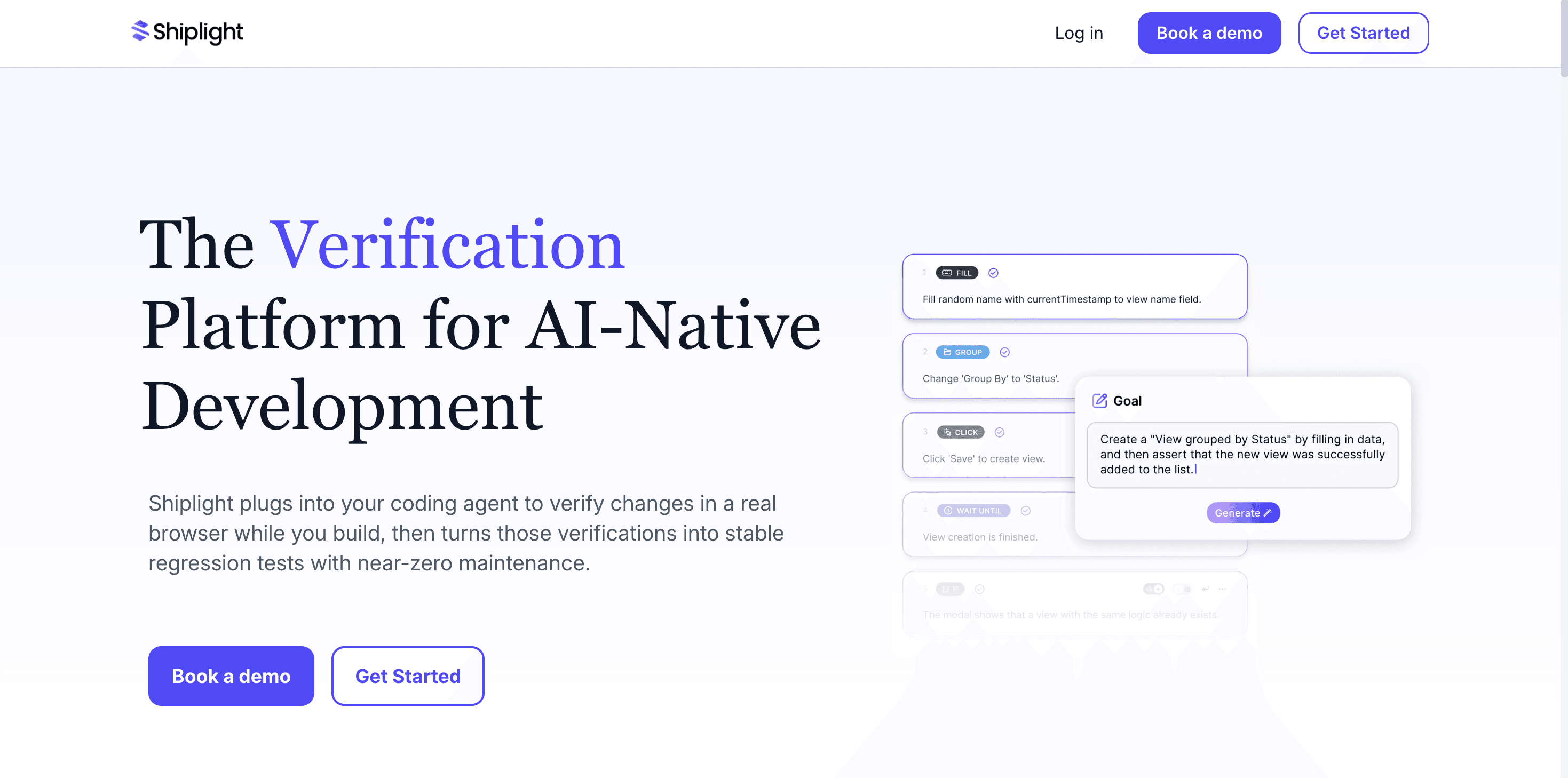
Best for: Engineering teams using AI coding agents that want UI verification and regression-test authoring to happen as part of development.
Avoid if: Your primary test authors want a point-and-click recorder, or you require native mobile testing today.
Shiplight takes a different approach from recorder-first codeless tools. It installs into coding agents such as Claude Code, Cursor, Codex, and VS Code as an MCP server plus Skills. This gives the agent access to a real browser so it can verify UI changes, reproduce failures, and turn verified user flows into E2E regression tests.
Tests are stored as readable YAML in the team’s git repository. Developers can review them alongside application code and run them locally with npx shiplight test. Shiplight is Playwright-compatible, so teams can use it alongside existing Playwright suites.
AI features: Each test step preserves its intended outcome rather than relying only on a recorded selector. Shiplight caches resolved locators for fast execution. If a locator stops working, it can resolve the step again from its original intent. Larger test changes can be proposed as reviewable pull-request diffs.
Supported environments:
Strengths:
Limitations:
Pricing: A free plan and bring-your-own-key option are available. Paid plans start at $79.99 per month. Shiplight can also run on customer-owned infrastructure, with enterprise plans available for teams requiring managed CI, security, and deployment controls.

Best for: Enterprise SaaS teams managing large UI test suites against frequently changing products.
Avoid if: You're budget-constrained — there's no meaningful free plan, and it's overkill for a stable app where re-recording is faster than AI healing
Testim's bet is that writing tests was never the expensive part — fixing them was. Every element gets a multi-attribute model, not a single locator. A developer renames a button's ID or swaps its class, and the AI finds it anyway through whatever attributes didn't change. No red test, no manual locator hunt.
That only matters at a specific scale. If you're running a dozen tests against a slow-moving app, re-recording is faster than trusting an AI to guess right. If you're running 200+ against something shipping weekly, the math flips — every avoided locator fix is an engineer not spending Tuesday morning babysitting a test suite.
It's also not free, in either sense. No meaningful free plan, and AI healing occasionally "fixes" a locator onto the wrong element on a genuinely chaotic UI — quietly, which is worse than a clean failure.
AI features: On failure, the AI classifies the type (network error, element-not-found, JS exception), groups similar issues across runs, and separates genuine regressions from flakiness. This improves testing efficiency when frequent UI changes would otherwise create repeated locator churn. Statistically flaky tests are quarantined to keep CI/CD pipelines clean while teams continue to execute automated tests in the background for monitoring. Targeted fix recommendations — locator updates, timeout tuning, data setup changes — are surfaced with each quarantine.
Supported environments:
Strengths:
Limitations:
Pricing: Paid only. Custom enterprise pricing. Trial available.
💡 Also read the guide on the best Testim Alternatives

Best for: Small teams that need a fast, simple cloud-based testing tool and don't need local execution.
Avoid if: You need local runs or complex custom logic — cloud-only execution means costs scale with run volume, and customization headroom is limited
Reflect.run makes one trade explicitly: speed in, flexibility out. Fastest onboarding and cleanest interface in this whole list, and it costs you cloud-only execution and a low ceiling on customization. That's not a hidden catch — it's the whole product decision.
For a team that's been putting off automation because setup felt like its own project, that trade is worth making. The interactive debugger — pause any step, inspect state, keep going — does more for first-time confidence than any onboarding doc could. You see what the test sees. Fitting, for a tool called Reflect — it's happy to show you exactly what's looking back at it. Less happy to let you run that test anywhere but its own cloud.
Where it stops paying off: the moment your scenario needs local execution or logic that doesn't fit a clean linear flow. Reflect didn't build for that case, and it shows.
If fast onboarding is the actual requirement, it's worth putting BugBug in the same trial window before committing. You get the same under-10-minute first test, but without giving up local runs — record locally, run in CI, or run in BugBug's cloud, your call.
AI features: AI-assisted element identification reduces locator fragility during recording. Step-level visual diffs on failure help identify what changed without manual screenshot comparison.
Supported environments:
Strengths:
Limitations:
Pricing: Free trial. Paid plans only. Costs scale with run volume.
💡 Check the best Reflect.run Alternatives
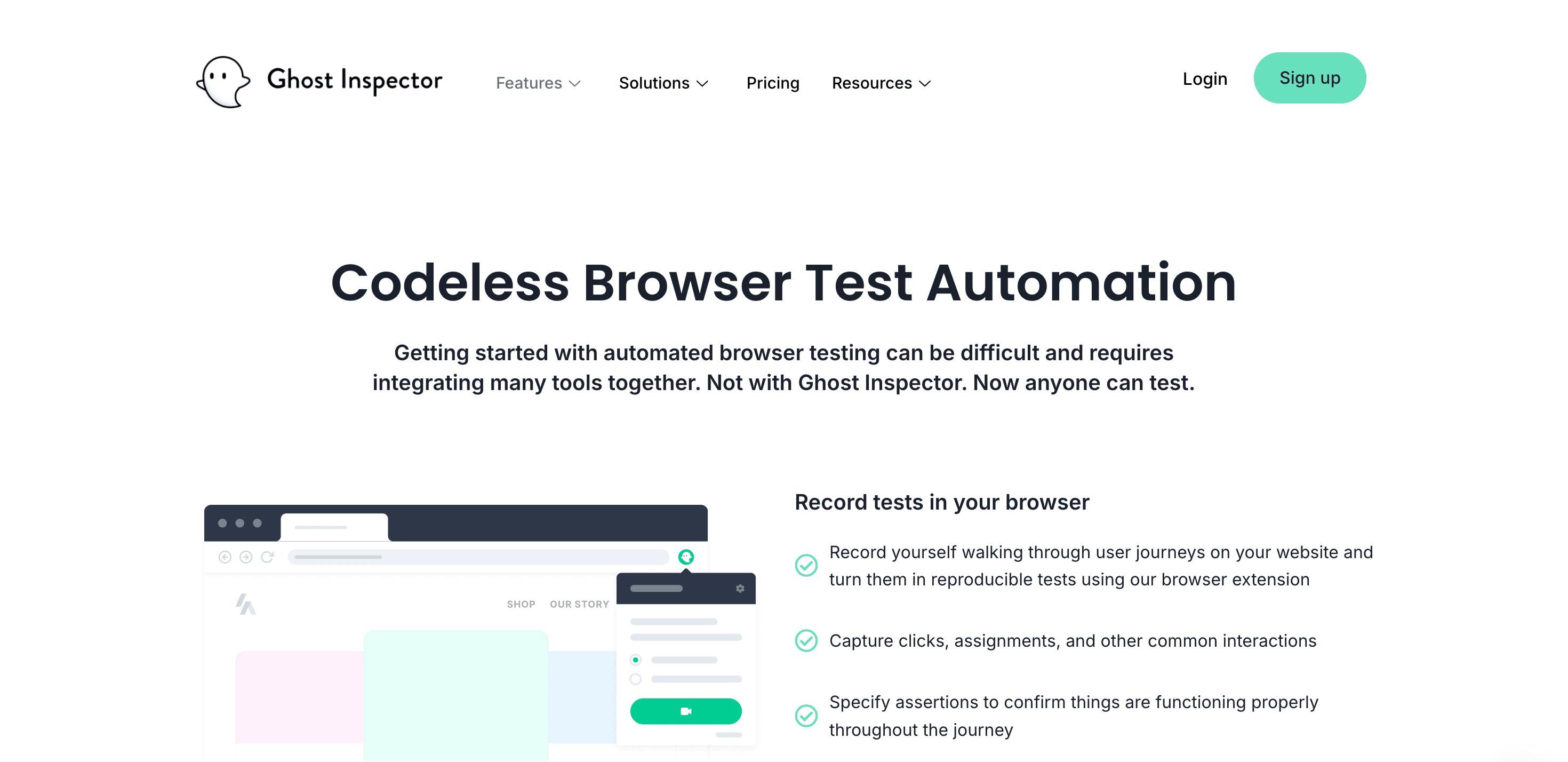
Best for: Teams whose primary use case is screenshot comparison and visual regression testing.
Avoid if: Your forms have validation, masking, or event listeners expecting real keystrokes — it uses JS injection, not real typing, and there's no free plan
Ghost Inspector picks a narrow lane and owns it: visual regression, without the developer tax.
Percy and Applitools want setup time and developer involvement before they're useful. Ghost Inspector's recorder skips that — no scripting, operable by anyone who can click through a page. That makes repetitive visual checks faster than eyeballing screenshots by hand, without pretending to replace a human reviewer entirely. It knows what it is.
The trade-off is in the fine print, not the pitch: form inputs get filled via JavaScript injection, not real keystrokes. Fine for a text field. Not fine for anything with input masking, validation, or event listeners waiting for a genuine typing event — those forms won't behave the way a real user's would, and the test will quietly pass on something that's actually broken. A bit ghostly, for a tool with that name — technically present, not always fully there.
AI features: AI-assisted screenshot comparison filters cosmetic noise from meaningful visual changes — distinguishing anti-aliasing differences from actual layout regressions. Failure notifications include annotated diff images highlighting changed regions.
Supported environments:
Strengths:
Limitations:
Pricing: Paid only. Starts at $49/month.
💡 Also check Best Ghost Inspector Alternatives
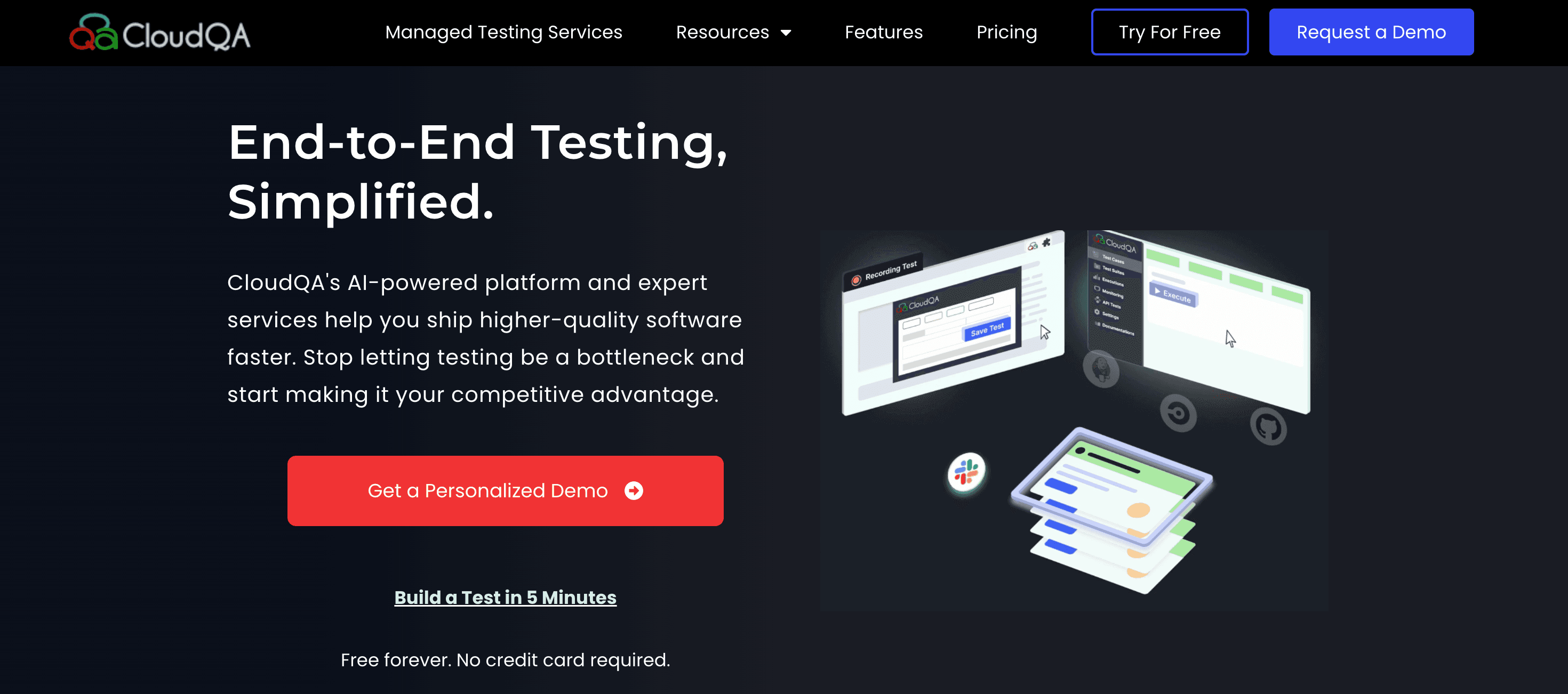
Best for: Web-focused SaaS and eCommerce teams that want cloud-based no-code automation with solid reporting and data-driven test support.
Avoid if: You need mobile coverage or local execution — both are limited/absent, and the ecosystem/community is smaller than BugBug, Testim, or Katalon
CloudQA's real bet isn't the recorder — it's the separation between test logic and test data.
Write the checkout flow once. Run it against ten product types, five coupon codes, three user tiers — without cloning the test ten times to change one variable. For an eCommerce team validating combinations instead of a single happy path, that's the difference between a test suite and a spreadsheet of near-duplicates nobody wants to maintain.
The reporting holds up its end too — customizable dashboards, external integrations, actual visibility instead of a pass/fail count. More than most tools at this price tier bother building. Credit where it's due: for a tool called CloudQA, the QA part isn't just in the name.
Where it gets foggier: everything runs in CloudQA's cloud, full stop. No local execution, thinner mobile support, and a smaller ecosystem than BugBug, Testim, or Katalon if something goes wrong and you're searching for an answer at 11pm.
AI features: AI-assisted element identification during recording generates stable selectors. On failure, AI-generated summaries correlate DOM state, screenshots, and step history to identify likely root causes. Selector self-healing attempts to recover from element changes on re-run.
Supported environments:
Strengths:
Limitations:
Pricing: Trial available. Paid plans for teams and enterprises.
Before reading the final recommendations, four questions eliminate most wrong choices before you spend time on trials, which is a useful framing in a fast-changing testing industry.
1. What happens when your UI changes? The ongoing cost isn't setup — it's fixing tests after a developer renames a button. Testim, KaneAI, BrowserStack, and Virtuoso QA bet on AI healing. BugBug's Edit & Rewind makes manual fixes fast. Shiplight stores each step's intent and re-resolves the locator from that.
2. Who writes the tests? QA engineers with some coding background: almost everything works. Zero scripting experience: BugBug, Reflect.run, Ghost Inspector, KaneAI, or BrowserStack. Katalon wants Groovy for anything non-trivial; Shiplight assumes your authors live in a coding agent.
3. What do you need to cover? Firefox or Safari: Katalon, BrowserStack, Virtuoso QA, Reflect.run, Ghost Inspector, CloudQA. Native mobile: ACCELQ, Katalon, KaneAI. API: ACCELQ, Katalon, Virtuoso QA, Testim, KaneAI. Database in the same test as the UI: Virtuoso QA only. Desktop or mainframe: ACCELQ, plus Katalon for Windows.
4. Authoring or execution? BugBug, Reflect.run, KaneAI, and Ghost Inspector author. BrowserStack executes. Testim and Virtuoso QA do both. If you have tests but can't run them reliably, the execution question matters more than the recorder.
Mostly, no. The recorder layer is where vendors make their money, so "free" and "codeless" rarely overlap in a way that survives a real regression suite — the handful of free recorders that exist struggle with dynamic elements and offer no scheduling, cloud runs, or team features.
If budget is the constraint, a free plan on a commercial tool gets you further than a free recorder. BugBug's free plan has no test limit, no user limit, and no local run limit — no credit card, no trial expiry. Cloud scheduling is paid, but local runs through the extension are unlimited and CI-triggerable.
👉 If you'd rather own the framework and write the tests yourself, that's a different decision with different trade-offs — we've broken it down in our guide to open source test automation tools.
There is no single "best" codeless tool. The right pick depends on what you're testing, who's writing the tests, and whether your problem is authoring them or running them.
| Team type | Primary tool | Complement with | Why this pick |
|---|---|---|---|
| Web-only B2B SaaS, 0–3 QA people | BugBug | Playwright (for the handful of flows that need framework-level control) | Fastest recorder here for Chromium flows, free plan with unlimited local runs, visual regression built in, and Edit & Rewind keeps maintenance cheap. You give up Firefox, Safari, and mobile. |
| Enterprise QA covering web, API, mobile, desktop, and mainframe | ACCELQ | Jira / Azure DevOps (traceability is built in) | One asset library across every surface, and the natural-language logic compiles to inspectable Selenium code you can export. Budget 1–3 weeks for onboarding. |
| Regulated team where one test must span UI, API, and database | Virtuoso QA | Your existing CI (Jenkins, Azure DevOps, GitHub Actions) | Plain-English authoring plus a human approval gate and audit trail over what the AI proposes — the thing regulated buyers actually get asked for. |
| Hybrid team that's web-only today but knows mobile and API are coming | Katalon | Postman (API), BrowserStack (real devices) | Codeless and scripted authoring in one tool, so you're not migrating platforms in month eight. You pay for it with a slower first day. |
| 200+ tests against a UI that ships weekly | Testim | TestDino or your own reporting layer | AI locators absorb the locator churn that would otherwise eat an engineer's Tuesday. Only worth it at that scale, and there's no meaningful free tier. |
| Engineering team building with Claude Code, Cursor, or Codex | Shiplight | Playwright (it's compatible), BugBug for flows a non-dev records | Verification happens inside the agent workflow, and tests land in your repo as reviewable YAML. Assumes your test authors live in a coding agent. |
The best codeless tool is the one your team still opens in month six — not the one with the longest feature table. Shortlist two, run the same three critical flows through both for two weeks, and let the maintenance burden pick the winner.
Automate your tests for free
Test easier than ever with BugBug test recorder. Faster than coding. Free local testing forever.
Get started
Your next release. Properly tested.
Join 1,200+ QA teams that automated their
regression coverage with BugBug.

Paweł Bylina is a software engineer, test automation product leader, and founder and CEO of BugBug, a low-code end-to-end testing platform used by teams in more than 50 countries. He has over 15 years of experience building software and leading engineering teams as a developer, engineering manager, CTO, and SaaS founder.
Paweł created BugBug after repeatedly seeing teams struggle with test automation that was costly to implement and difficult to maintain. He now works closely with QA engineers, developers, and engineering leaders to improve how software teams create and maintain reliable automated test coverage.
His expertise includes end-to-end testing, regression testing, browser automation, low-code test automation, QA strategy, and software quality. He shares practical insights drawn from building BugBug and working with software teams worldwide.
Get more testing tips and product related content. Zero spam.
Discover top Selenium practice websites designed for a variety of testing scenarios. Sharpen your automation skills.
Six regression testing tools for web teams, from code-first options like Playwright and Cypress to codeless tools like BugBug.
This article will introduce the best Software Testing YouTube Channels. These channels have much helpful information, tutorials, and insights to help software testers improve their skills, stay updated on the newest testing tools and techniques, and succeed in their testing careers.
data-testid attributes serve as a simple yet powerful tool for selecting elements within tests. Let's dive in and explore.
Playwright vs Selenium. Which wins for modern apps, when Selenium still beats it, and what to do if you can't code.
Explore the truth behind the myth that Selenium is completely free. Uncover hidden costs and learn how it can revolutionize your test automation.
Explore the best websites with bugs for testing in 2026. Practice manual and automation testing on real-world platforms.
Discover essential business tools for startups. Read the article to find the right tools for your success.


